White BalanceGetting Your Colors Rightby Sue BarthelowGetting your whites in balance is critical when you want your photo to look right from the start. Sure, you can make color corrections when you process, but wouldn't it be better if you didn't have to? Light in the shade differs from direct sunlight. Incandescent light is different from fluorescent light. Each situation comes with its own color cast. Without adjusting for these color casts, your photo can end up looking too blue, green, yellow, orange or red. Light's Color TemperaturesLight is often described as being cool or warm depending on its color temperature. Although color temperatures vary depending on intensity, the following examples give you an idea of how the temperatures change. Twilight has the highest temperature (12,000 degrees Kelvin), and makes the light appear a cold dark purplish blue. The blue color temperatures move down the color palate towards aqua as they move through shade (7500 degrees) and clouds (6500 degrees) to direct sunlight (5600 degrees) and warm fluorescent (4000 degrees). The color temperatures then move into the greens, yellows, oranges, and reds as they continue down from fluorescent through tungsten (3200 degrees), sunrise/sunset (3000 degrees), incandescent (2800 degrees) and candle (1800 degrees). You can adjust for your scene's color temperature by changing your camera's white balance setting or by using a color compensating filter. In both cases, you're removing unwanted color casts by making slight corrections such as adding warm colors to cold or cold colors to warm. The resulting combination brings the white tones closer to pure white. Digital CamerasMost digital cameras let you set your white balance. Other than auto and flash settings, typical settings include direct sunlight, shade, cloudy, fluorescent and incandescent/tungsten/halogen. The shade and cloudy settings compensate for the overly blue tones by adding warming filters to balance out the blue casts. The fluorescent and incandescent settings add cooling filters to correct for the green/yellow/orange/red casts. Many digital cameras let you define your own custom setting for a color temperature that doesn't quite match the standard choices. If you're not sure which white balance to choose, take a picture or two and view them on your camera's monitor. Then, pick the setting that matches your scene the best. Color compensating filters work with digital cameras too. Want to use a filter? Set your white balance to direct sunlight, which is your base color temperature, and then go ahead and use a filter. Film CamerasIf you're using daylight film, you can use a filter to compensate for the color cast caused by a non-daylight situation. Filters that correct for blue color casts are called warming filters or CTO for color temperature orange. Filters used for red/orange color casts are called cooling filters or CTB for color temperature blue. Those that remove the green color casts caused by most fluorescent lights are called minus green. You can buy color compensating filters in varying strengths. If you're using black and white film, you can use a filter to emphasize different colors in your scene. That lets your photo show more levels of light and dark. Use a yellow filter for an outdoor photo to improve the sky. Use an orange or red filter if you want to darken the sky. Add a deep green filter to lighten trees or to give you better contrast for red and orange toned bricks, dirt or rocks. Example PhotosThe photos show what happens when you try different white balance settings on a digital camera. These photos were taken indoors with light coming from incandescent lights along with daylight coming through a window. Notice how the shade camera setting gave the image an orange cast. Having been told to expect an outdoors scene taken in the shade, the camera added its own warming filter to compensate for the blue tones you get from shade. A similar result happened when using the fluorescent camera setting. The camera added a color filter to balance out what it thought was fluorescent lighting. Although there was a mixture of lighting, the image came out with the best colors when the white balance was set to incandescent. |
||||
 Shade Setting
|
 Fluorescent Setting
|
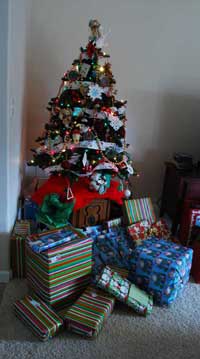 Incandescent Setting
|
||